All about AI prototyping: A guide for product managers
What you need to know about using AI prototypes to shape your product roadmap
Last updated: September 2026
What is the most important product management artifact? There is no question that it is your roadmap. But AI has introduced an important new companion to it: the AI prototype. AI prototyping gives you a visual, interactive way to explore and test ideas yourself — beyond what whiteboard sketches and written requirements can show — so you can shape each roadmap feature with greater clarity.
In this guide, you will learn what AI prototyping for product managers entails and how it can inform smarter roadmap decisions. Read on or jump ahead:
What is AI prototyping?
AI prototyping uses generative AI and natural language prompts to turn an idea into an interactive experience. The result is often clickable and can simulate the interface and behavior of a live application. By turning an idea into something tangible, AI prototyping helps you test concepts and gather feedback to refine the experience before you commit to building the actual functionality.
How does AI prototyping work?
Prompt, generate, test, and refine. While the details vary by tool, the basic process of AI prototyping is the same:
Tell AI what you want to prototype. Start by describing the experience you want to create, including who it is for, the problem it solves, and how it should look and function. Some AI prototype generators work from conversational prompts alone. Others can draw on existing product context by integrating with other tools, like roadmap software.
Generate a first version of your AI prototype. Once you have given AI enough context, ask it to create an initial version — no coding needed. Then, use follow-up prompts to adjust the layout, style, and details until the experience reflects what you want to explore.
Test your AI prototype. Share it with users and teammates and ask them to try it out. Pay attention to what works, what creates confusion, and what their feedback reveals about the experience.
Refine and repeat. Use what you learn to improve the prototype, then test it again. Continue iterating until you have a version that addresses the user need and gives you confidence in the direction — using it as supporting evidence for your roadmap.
For a more in-depth look at this process, check out our guide on how to create a software prototype.
What can you build with an AI prototype?
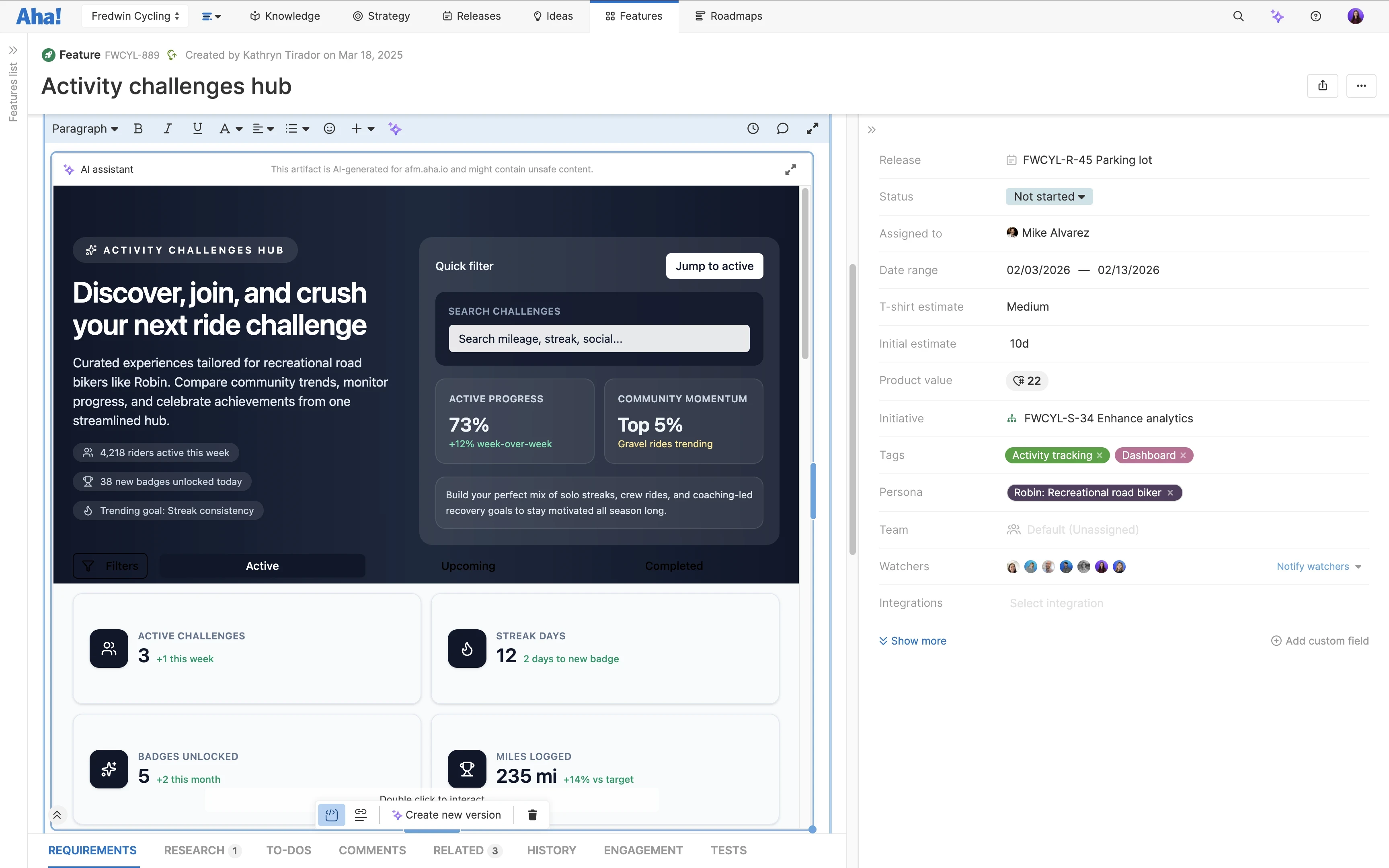
With an AI prototype, you can build interactive visuals with screens, multistep flows, and sample data. That means the prototype can respond like a live experience when someone clicks a button or fills out a form. People often build AI prototypes of websites and mobile apps, but for product teams, AI prototypes are typically built to represent a new feature or enhancement for a software product — showing the potential layout of the solution.
You can build AI prototypes at varying levels of detail based on what you are trying to learn. A low-fidelity prototype might only include a single screen with limited page elements, so you can quickly compare options before committing to a design. A high-fidelity prototype looks and behaves more like the final product, so you can demo a polished experience to stakeholders.
Some AI app generators let you turn a high-fidelity prototype into a proof of concept with a database for deeper testing (or even a full AI app). But the prototype itself is primarily a tool for exploring and testing ideas.