Organizational chart template
Map your company structure so everyone knows how teams connect
Use template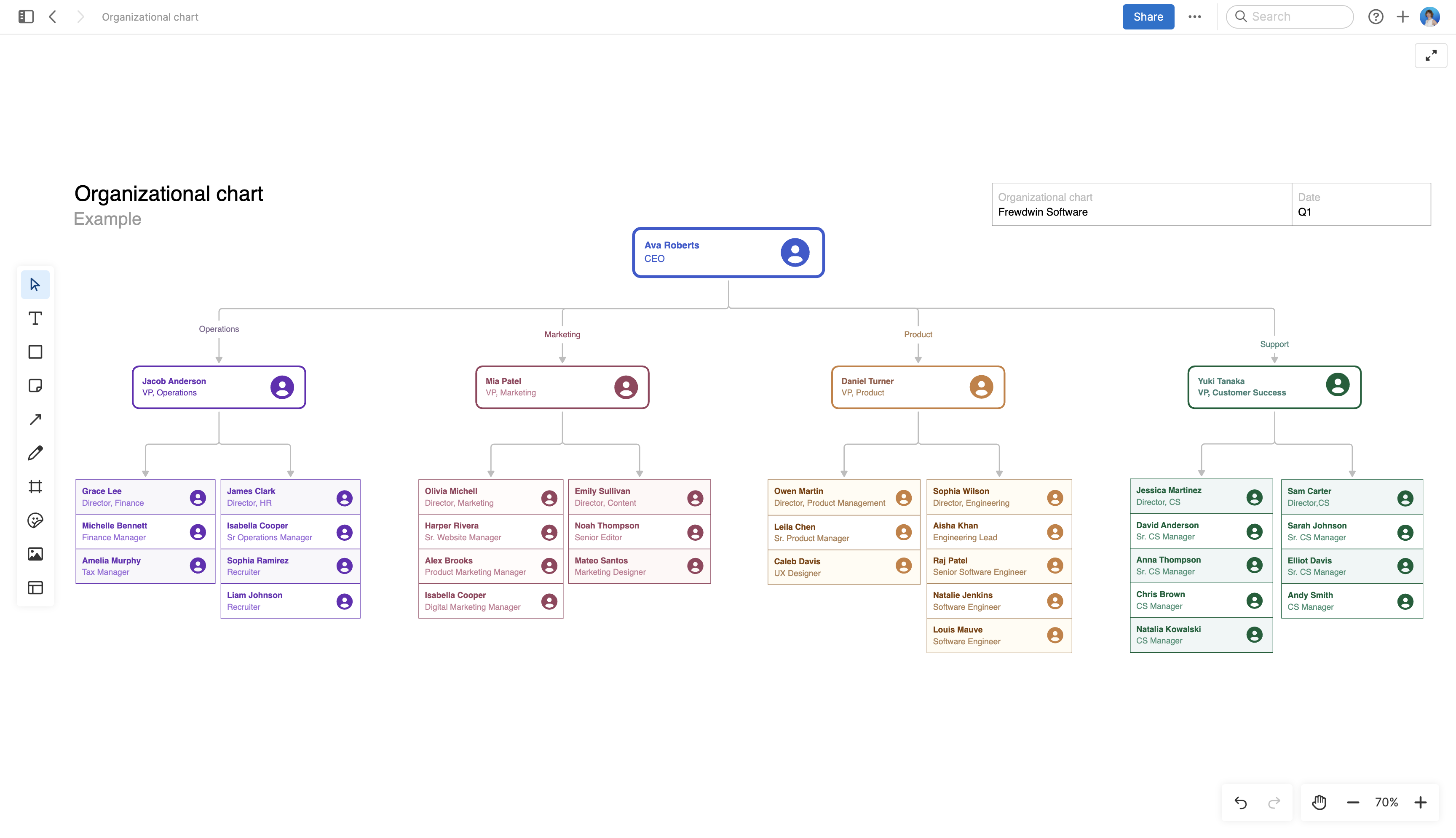
About the organizational chart template
An organizational chart shows who does what in your company and how different roles connect. When people see the full structure, they can understand which teams work together, how departments are organized, and where their role sits within the company. This template gives you a clean starting point to map out your organization and keep it current as your team grows.
Included in the organizational chart template
This organizational chart template includes built-in capabilities such as:
A visual hierarchy structure to organize roles and departments
Customizable boxes for names, titles, and team information
Color-coding to differentiate between functions or levels
Easy-to-adjust connector lines to show reporting relationships
How to use the organizational chart template
Start by adding the leadership team and build out each function underneath. The template uses a standard hierarchy format, but you can adjust it to match however your company actually works. If you have matrix reporting or shared roles across teams, add connector lines to show those relationships.
Use the alignment and grouping tools to keep boxes organized as you add more people. You can also add photos to personalize the chart by uploading images or dragging them onto the whiteboard.
Add the chart to your knowledge base and link to it from onboarding materials or company documentation. Or export it as a PDF or image to include in presentations and other materials.
Best practices
Build a clear and useful reference.
Group by function: Organize people into departments or teams: product, engineering, marketing, operations, or support. Use clear labels so anyone looking at the chart understands how work is divided.
Show reporting relationships: Use lines to indicate who reports to whom. If someone has a dotted-line relationship or works across multiple teams, include those connections so people understand the full reporting structure.
Choose the right level of detail: Decide whether to show every individual or just leadership and key roles. For larger organizations, consider creating department-level charts that link to more detailed team breakdowns.
Assign an owner: Designate someone — typically in HR or operations — to maintain the chart. They should update it when people join, leave, or change roles.
FAQs about the organization chart
Why is an org chart valuable?
An org chart helps people understand how your company is structured and who is responsible for what. New employees use it to orient themselves and figure out who they will work with most closely. Existing team members reference it when they need to know who makes decisions about specific areas or which teams to coordinate with on cross-functional projects. It also helps leadership spot gaps in coverage or areas where reporting lines have become unclear.
Who should use this organizational chart template?
HR teams typically maintain the org chart, but operations leaders, chiefs of staff, and department leads often create them as well. Anyone responsible for onboarding new employees or communicating company structure should have an up-to-date version. Founders and executives at growing companies use org charts to plan hiring and visualize how teams will scale.
What should you include in an organizational chart?
Include each person's name, title, and reporting relationship. For leadership roles, add direct reports so people can see team size and scope. You can also include contact information, location for distributed teams, or tenure (if that is relevant to your company). Avoid including too much detail — the chart should be scannable, not comprehensive.
How often should you update my organizational chart?
Review it quarterly (at least) to catch any changes you missed. If your company is growing quickly, you might need to update it monthly. The goal is keeping it accurate enough that people trust it as a reference.
Is this template free to use?
Yes. To use this product updates template, sign up for a free 30-day trial of Aha! Whiteboards. (You can also try this template in Aha! Roadmaps if you need a complete product management solution.) Easily customize the template to suit your needs, then share it with as many people as you want (for free) to streamline collaboration.