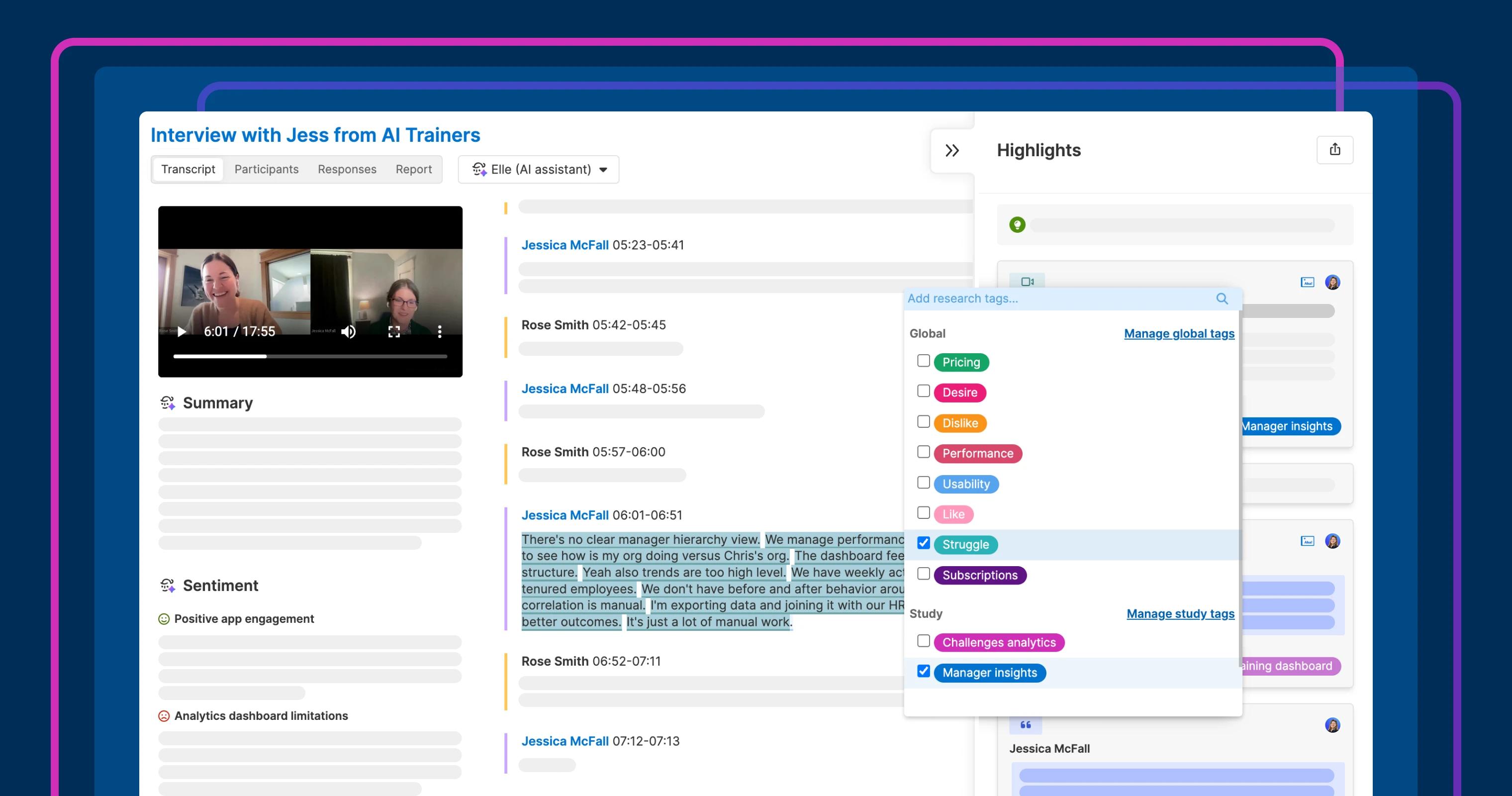
Manage global and study tags separately to keep research organized and surface patterns in Aha! Discovery.
Introducing a new way to tag insights in research studies


Customer interviews generate insights worth keeping — some are generic like a customer identifying a bug, while others only make sense within a single research study. You make those insights findable with tags, but one shared list eventually becomes harder to use than it should be.
Take control of how you organize research findings with new study-level tags in Aha! Discovery. These are available alongside existing global tags.
Categorize insights at the right level
Tags in Aha! Discovery help you group interview highlights and reference them later. Until now, global and study-specific labels all went into the same list — broad themes like "usability" sat next to one-off labels from a single study, making it harder to apply tags consistently across studies.
Two levels of tags give you more control. Use global tags at the account level for the themes you want to watch across all studies. And add study tags that only appear within a single research project to capture the specific questions, workflows, or UI areas you are exploring. This keeps your global list focused while giving each study enough detail to surface precise themes.
Here is how it works:
Track big picture themes: Use global tags for topics that stay consistent across every study.
Organize insights for each study: Create labels tailored to what you are investigating in a single project.
Find patterns faster: Filter highlights by tag in reports to see which trends show up most often — and use that evidence to prioritize what comes next.
This gives your team more control over how you categorize insights and makes it easier to analyze research across studies.
In the example below, we used global tags to capture broad themes like performance, pricing, and usability. And we used study-level tags to capture feedback related to analytics.
Study tags are available to all Aha! Discovery customers.
How to get started
Open a study and use the Tags dropdown (available from the tag icon in any highlight) to see global and study tags in separate sections.
Select Manage global tags or Manage study tags from the dropdown to review and edit each list.
Create new tags and choose whether they are global or study tags.
Apply tags to highlights from interviews and files as you analyze your research.
Filter the Highlights report and list reports by tag to surface the most relevant insights.
📚 For more details, read the full support article.
Once you have tagged your highlights, use a chart to visualize how often each tag appears. Seeing a theme like "performance" show up 14 times across studies gives you something concrete to act on. Set up tags today, then use Elle (the AI assistant) to help find and tag relevant highlights.
Start a free trial of Aha! Discovery
Aha! Discovery is the new way to manage customer interviews, uncover key product insights, and link them to your roadmap. Sign up for a free 30-day trial or join a live demo to see why more than 1 million product builders trust our software to build lovable products and be happy doing it. Contact us if you are interested in trying Aha! Discovery in your Aha! Roadmaps or Aha! Ideas account to validate your plans with customer sentiment.

