User story map template
Align your product roadmap with the user journey to better meet user's needs
Use template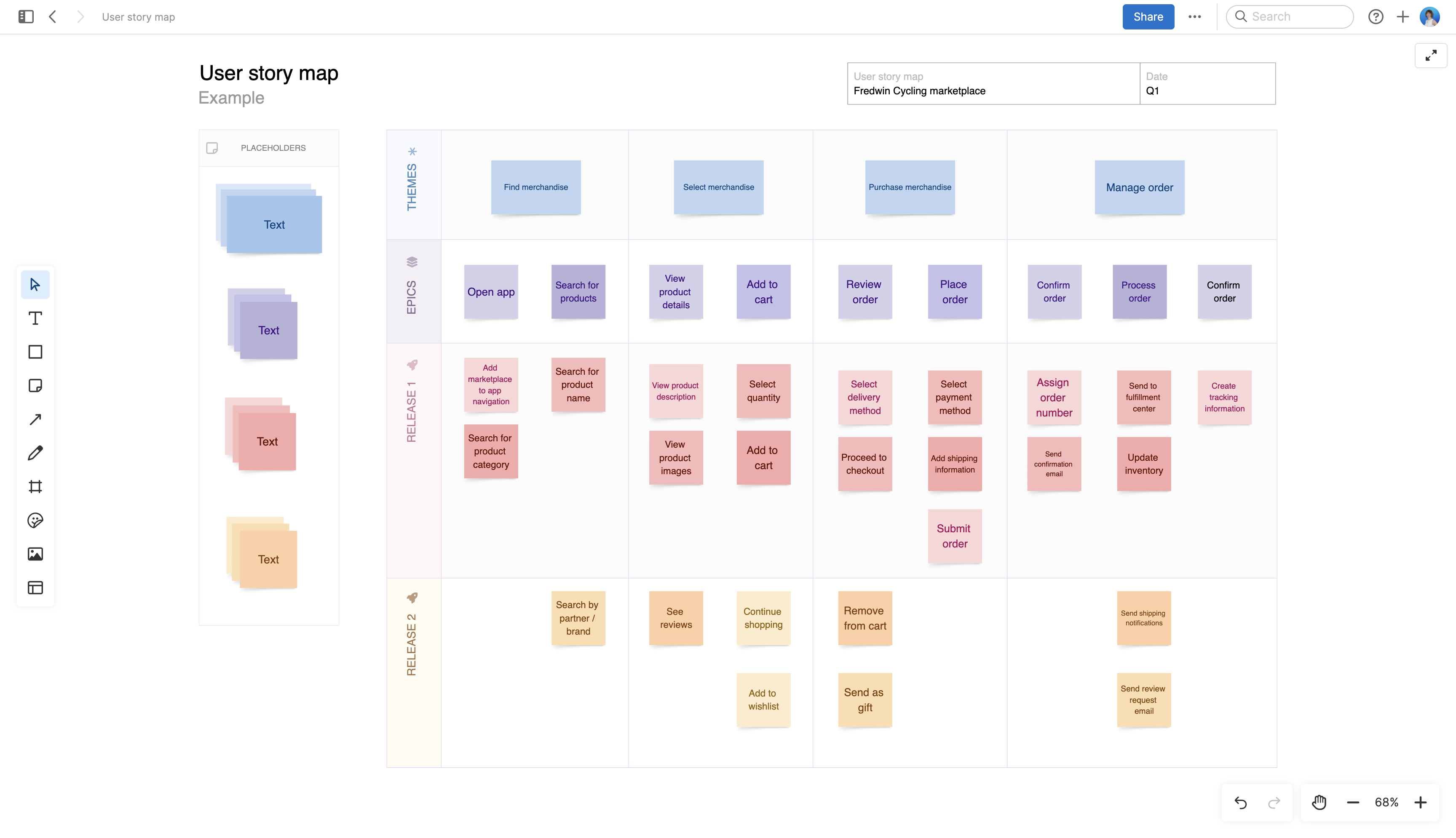
About the user story map template
User story maps are incredibly powerful. They give you a way to visualize and organize product work based on the tasks your users are trying to complete. Grouping work this way helps you prioritize product improvements that will have the most value on customers.
The user story map template start with "themes" — think of these as discrete steps in the user journey. For instance, our sample content considers the steps someone needs to take on an ecommerce site as they try to find and ultimately buy merchandise. With major themes defined, you can then break down each theme into epics and user stories.
At the end of a user story mapping exercise, you will want to schedule your prioritized stories into releases. Convert any sticky notes on your whiteboard into actionable product work in Aha! Roadmaps.
Best practices
Focus on building what customers really need.
Capture the user journey Frame the problem that your user is trying to solve, adding the steps in their journey to your story map from left to right. Then, add epics to group the key actions the user is trying to complete as part of each step.
Define new functionality Break down each epic into smaller user stories, placing them in priority order. This way you can see which features will improve the user experience and which are not as important to helping your customer solve their challenge.
Plan upcoming releases Add horizontal swimlanes to your user story map to represent upcoming releases. Organize user stories by release to plan when you will deliver the new features.
Share and discuss Encourage team conversations about the user experience and the work required to improve it. Use the map to come to a shared understanding of what to build, when, and why.
FAQs about the user story map template
Who should use a user story map template?
This template is built for product managers and cross-functional teams who want to plan work around the customer experience rather than a flat backlog. It works well for teams practicing agile development, but any team defining a multistep user journey can benefit.
Why is a user story map helpful for product planning?
Traditional backlogs list work in isolation, without showing how each piece connects to the customer's experience. A user story map keeps that connection visible — so a team can prioritize based on value to the user instead of urgency or convenience.
How does a user story map fit into a broader product strategy?
A user story map does more than organize a single sprint's worth of work. Product teams often revisit it when setting new goals or checking whether current work still supports the intended user journey. Over time, it becomes a reference point for measuring whether a product is solving the problems it was supposed to address.
What is the difference between a user story map and a product roadmap?
A user story map focuses on the user's journey and breaks it into themes, epics, and stories for planning purposes. A product roadmap in Aha! Roadmaps shows how that work is scheduled and communicated across releases. Many teams map stories first, then convert them into features to build out a full roadmap.
Is this template free to use?
Yes. To use this user story map template, sign up for a free 30-day trial of Aha! Whiteboards. (You can also try this template in Aha! Roadmaps if you need a complete product management solution.) Easily customize the template to suit your needs, then share it with as many people as you want (for free) to streamline collaboration.