About the process flow diagram template
Projects rarely stall because of one big problem — it is the small handoffs that slow things down. Maybe release tasks bounce between teams or a customer workflow takes longer than anyone expected. The process flow diagram template helps you capture that reality on one board.
Map each activity, decision, and ownership boundary so everyone can see how work actually moves from start to finish. It is especially useful for any repeatable process that involves multiple teams or dependencies — like customer onboarding, release management, support escalation, or approval workflows. With ready-made shapes, connectors, and swimlanes in Aha! Whiteboards, you can build and refine your process quickly and use it to start conversations about how to improve.
Included in the process flow diagram template
This process flow diagram template includes built-in capabilities such as:
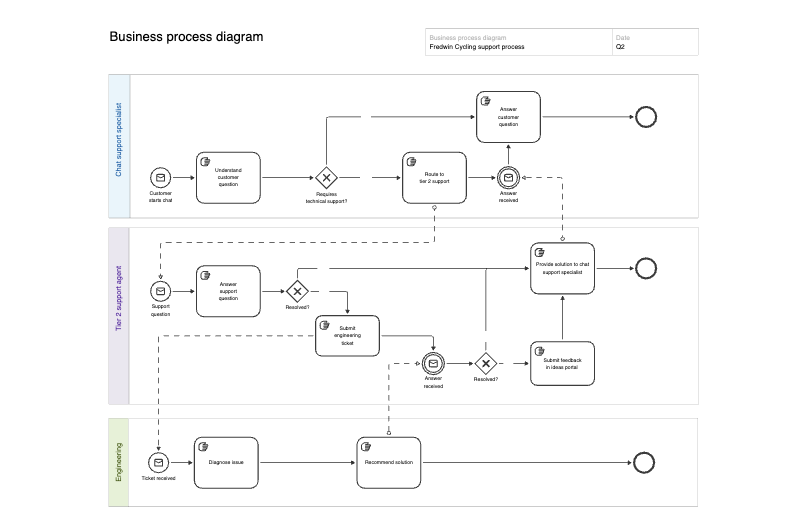
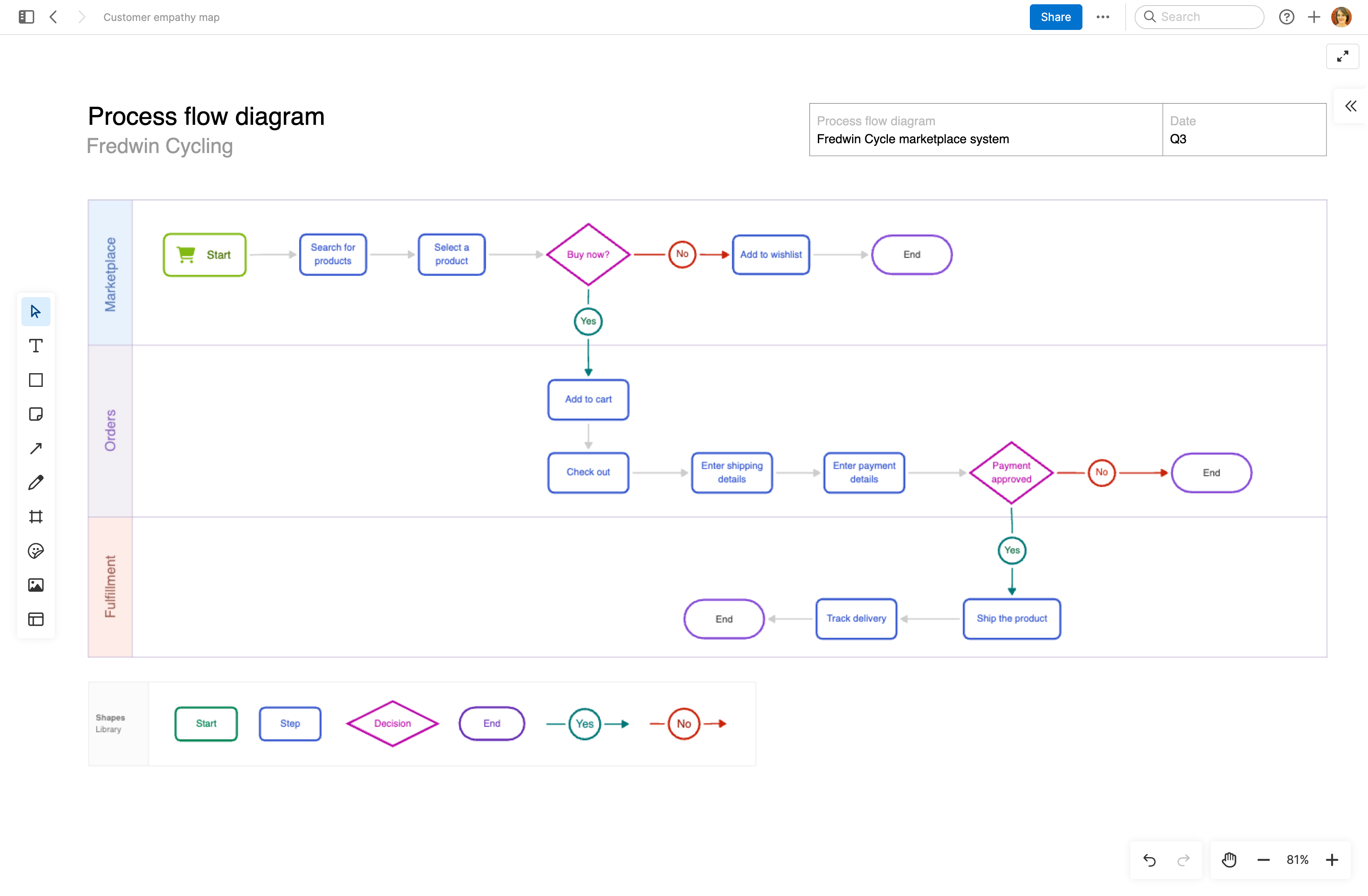
A ready-to-use layout with start, step, decision, and end shapes
Connectors and swimlanes that show how steps link together and clarify ownership
Business Process Model and Notation (BPMN) diagram shapes — a standard notation for visualizing business processes, useful for showing how tasks, decisions, and handoffs connect to different steps and actions
Auto layout tools to keep diagrams structured as they evolve
Inline comments to gather feedback, questions, and ideas from teammates
An AI assistant that can help you generate or adjust flows with a simple prompt
How to use the process flow diagram template
Start by defining the process you want to examine — something repeatable that involves multiple teams or dependencies. Add shapes for each step, then connect them to show how work progresses. Use decision diamonds for branching paths and swimlanes to clarify ownership. If you work with formalized standards, you can use BPMN shapes to represent specific actions or events.
Once your draft is in place, layer in insight. Add sticky notes where delays occur, use comments to capture team feedback, and flag steps that need further review. You can build this solo and share it for input or map everything together in a live session.
After you align on the process, you might want to link steps to related records in Aha! Roadmaps so everyone can see how the workflow connects to planned work. This turns your visual map into a practical reference for improving coordination and delivery.
Best practices
Turn your process diagram into a tool for faster, more consistent teamwork.
Choose the right process to map: Focus on workflows that cross multiple teams or cause recurring confusion. People consistently debating who owns a step or why something takes so long is your cue that a visual map could help.
Expose ownership clearly: Use swimlanes to show responsibility end to end. When two lanes touch the same task, clarify roles or consolidate steps.
Balance depth with usability: Include enough detail to track decisions and dependencies, but stop short of task-level granularity. Things are probably too detailed if you cannot explain the flow in under two minutes.
Standardize how your team reads flows: Pick one color and shape convention and apply it across boards. This makes it easy for designers, engineers, and product operations to interpret flows the same way without reorienting each time.
Start faster with AI: Open the AI prompt library and select the Whiteboard user flow diagram request to generate a first draft. Then, spend your time refining the flow and aligning the team.
FAQs about the Process flow diagram template
When should I create a process flow diagram?
Build one when you need to understand how work really moves. If a process involves frequent handoffs, recurring bottlenecks, or unclear ownership, mapping it together can reveal where expectations or accountability need adjustment.
How detailed should a process flow diagram be?
Capture every major step that changes ownership, adds time, or involves a decision. Skip microtasks that do not affect flow or accountability. When a section becomes dense, create a separate subprocess diagram so the main view remains easy to follow.
How can AI help me build a process flow diagram?
The AI assistant can draft an initial flow based on your prompt (for example, "Show the steps for our weekly release process"). It can also organize shapes, apply auto layout, and summarize changes as you refine the diagram. This lets your team focus on evaluating the process rather than drawing it from scratch.
How can I use this diagram to improve team performance?
Review the diagram regularly with the people who own each part of the process. Highlight where work stalls or loops back and capture ideas for improvement directly on the board. Linking those insights to initiatives in Aha! Roadmaps helps turn observation into progress.
Is this template free to use?
Yes. To use this process flow diagram template, sign up for a free 30-day trial of Aha! Whiteboards. (You can also try this template in Aha! Roadmaps if you need a complete product management solution.) Customize the template to fit your needs, then share it freely to streamline collaboration.