When overmind isn't enough and I'm over it all
I built a tool called overitall (oit). It's a terminal UI that combines process management with log viewing — think overmind plus a log viewer (like lnav) that can actually keep up with modern, noisy apps. If you're a terminal‑first developer drowning in logs, this might be for you. Install it with brew install aha-app/overitall/oit, then run oit in place of overmind (or foreman) to run your Procfile processes.
Let's talk about why we got here.
In development, you rarely care what happened an hour ago. You care about the last request or how you'll find information in the next one.
Remember when you first installed a great new tool?
You start using something new, and it just feels like an upgrade. Everything works a bit better than before. I remember finding overmind and thinking it was a great tool — simple and powerful. It wrapped Procfile processes in tmux, which meant I could attach to individual processes. I could restart just the web server without touching the workers. And I could connect a debugger to a specific process and step through code while everything else kept running.
At the time, I used tmux constantly. My fingers knew the key sequences without thinking. Overmind slotted right into that workflow.
The debugging story was good too. Ruby's debugger could attach to stdin, so I'd drop a binding.pry somewhere, connect to the process in overmind, and I was debugging. No special setup. No ports to configure. Just tmux doing what tmux does.
Time moves on, things change, and the world turns
I switched terminals; kitty had better performance and native splits, and I liked its simplicity. I started using kitty's panel management instead of tmux and drifted away from tmux until I wasn't using it at all.
Overmind still worked, of course. I just stopped connecting to processes. The tmux integration that had made it useful became a feature I no longer touched. For years, my development workflow looked like this: a Kitty window split vertically, overmind running on the left, tail -f log/development.log on the right.
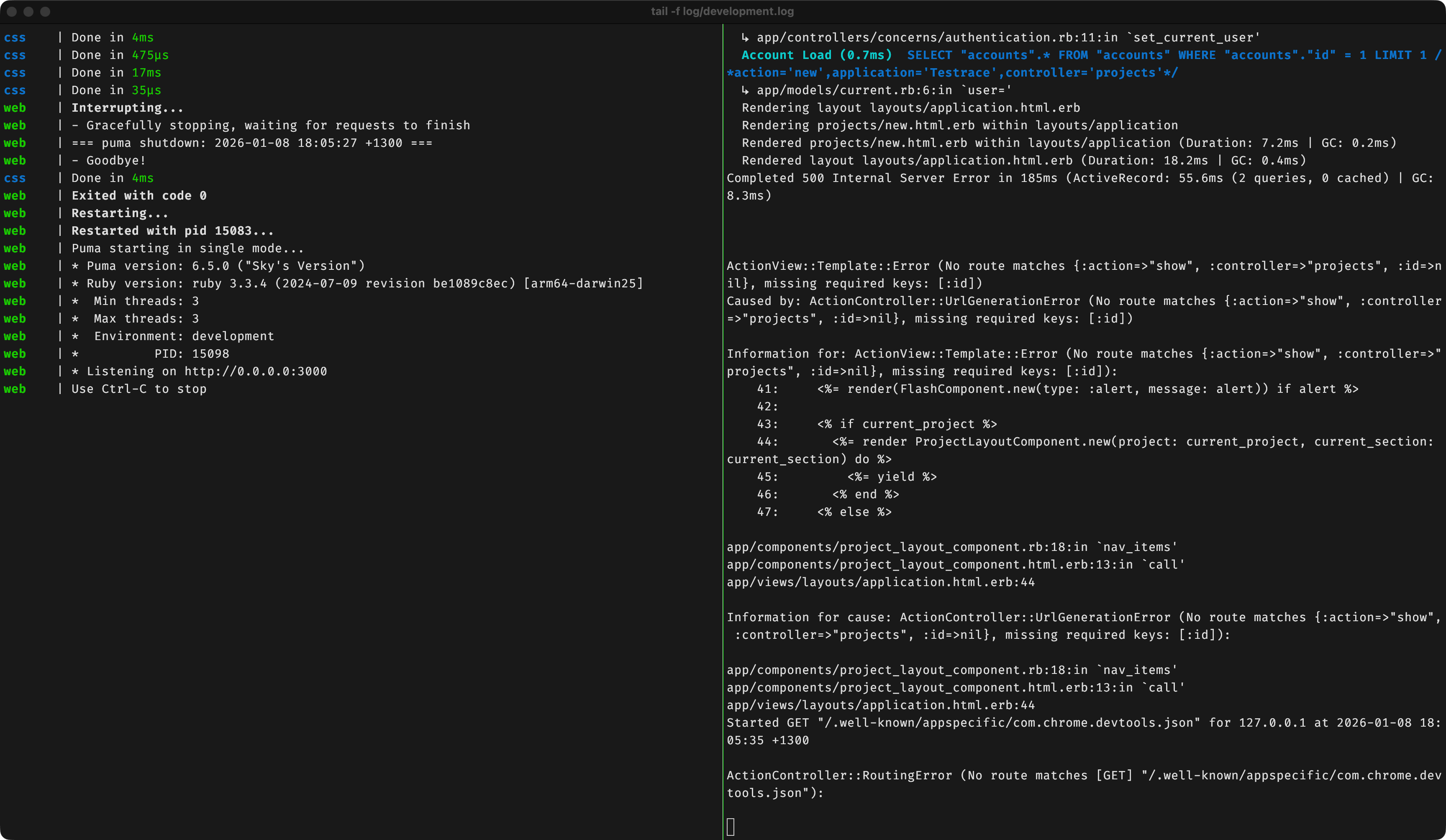
At Aha! we lean heavily on logging, and the logs got denser. The output from a single request might span dozens of lines with metadata tags, correlation IDs, and timing information. In production, these logs power our observability, and we have great tooling to match. But it can be overwhelming in development.
I found myself scrolling more, searching more, and losing more context. The interleaved output that once seemed helpful now obscured as much as it revealed. Which log lines belonged to my request? Which worker processed that job? Where did that error actually originate?
I started using lnav occasionally, which parses log formats, highlights errors, and lets you filter and search. It's a really good tool, but it isn't really focused on my day-to-day development work.
OIT: Developer-focused process and log management
Overitall combines process management and log viewing in a single terminal interface.
For process management, the process list at the top of oit solved the biggest problem I had with overmind: less visibility into the current state of things. You can see what is running in oit and add custom labels for stateful processes. For example, you could start your webserver process in the "starting" state and specify that it changes to "running" when it logs "Listening on port 3000" on stdout.
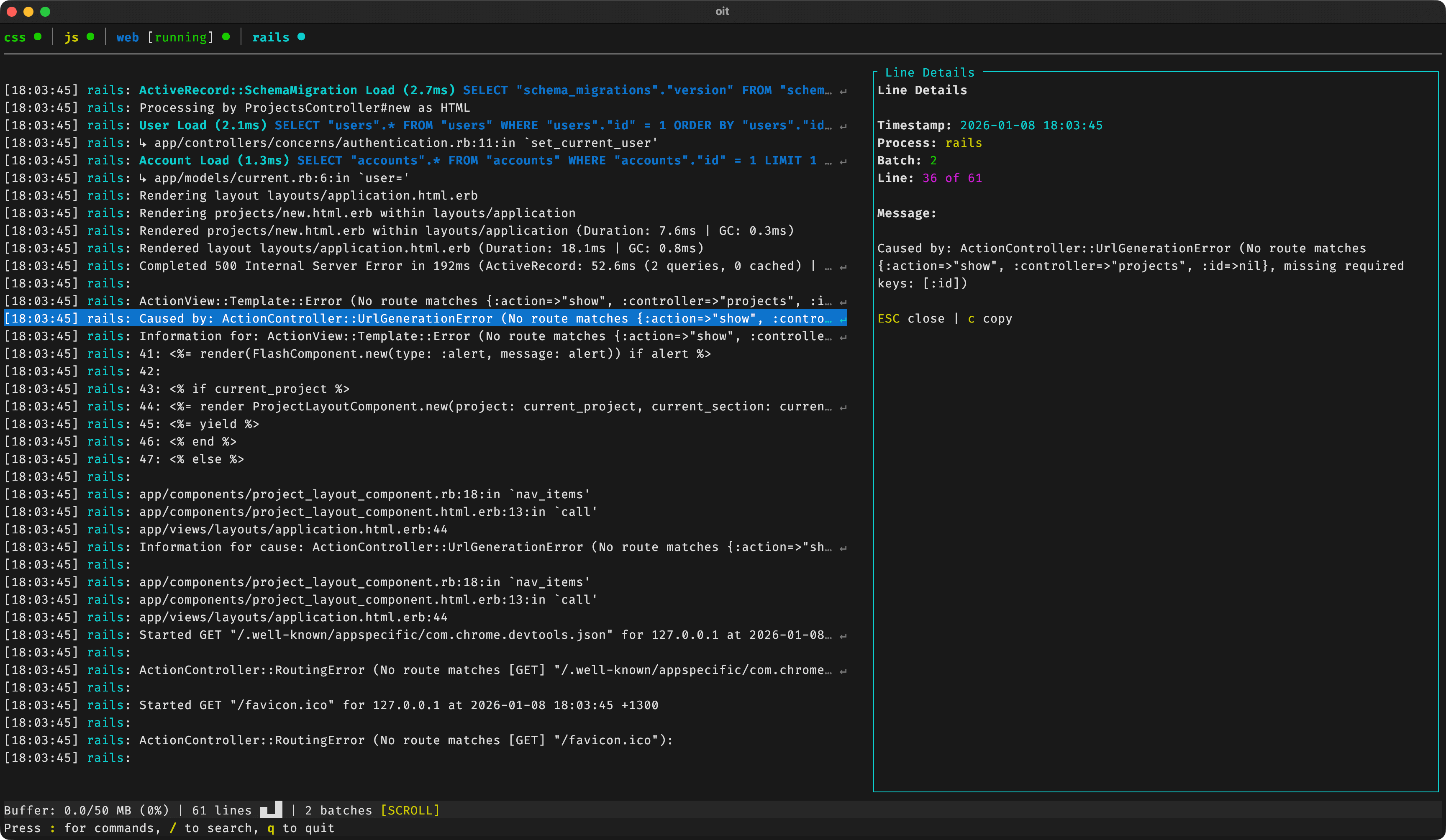
The log view is unified and interactive. It interleaves output from all processes and any standalone log files you want to tail (like log/development.log). It also behaves like a tail by default. Here are some of the things you can do:
Filtering that sticks
Add an include filter with :f ERROR, and only matching lines appear. Add an exclude filter with :fn DEBUG to hide noise. These filters persist across sessions and appear in the config file.
Trace detection
If your logs contain correlation IDs, :traces finds them and lets you filter to a single trace. This works by looking for nonhomogenous long strings (e.g., things that look like IDs and appear in one section of the log). This becomes even more useful if you pass correlation IDs between processes.
Search that narrows
/ starts a search that filters logs as you type. Arrow keys navigate between matches. It's like grep, but interactive.
Contextual copy
Press x to copy all lines from the same process within one second of your selection. This is exactly what you want when you're copying an error with its stack trace.
VS Code integration
Run oit vscode install to get the process control panel in VS Code, so you can restart processes without leaving your editor.
IPC and AI integration
Once I had oit managing processes and logs the way I wanted, I hit another itch: I wanted my tools to be able to drive it too. Overmind can be controlled from another process or terminal via IPC commands to restart and interrupt the controlled processes. oit has similar capabilities, but extends them to log control. You can search through logs, filter by process, find errors, and get summaries using CLI commands while the TUI is running.
This becomes even more powerful if you let an LLM tool like Claude Code use oit. Run oit skill install to teach it how to search logs, find errors, and restart processes on its own. Your editor and AI assistant can understand the same live log stream you do.
Should you use it?
Overmind was the right tool for a while. When it stopped being that, I built what I needed next. Overitall is opinionated toward my workflow: Procfiles, noisy logs, terminal-based development. If that sounds like you, give it a try.
Overitall is open source and available on GitHub. We're hiring engineers as well — take a look at our open roles.